PKPLUS Game Login Guide – How to Access Your Account in Pakistan
Every feature inside the app starts with a successful login. From playing games to checking your wallet, you need access to your account first. Usually, everything works smoothly but login issues can sometimes appear when you least expect them.
In this guide we will cover how to log in to your PK PLUS app account step by step. You’ll also find solutions to common login problems that users often face. For a complete guide on the PKPLUS earning game, you can check the detailed article on PKPLUS.com.pk.
What is PKPLUS Game Login?
PKPLUS Login is the way to access your existing account on the platform. Once logged in, you can play games, check your balance, claim bonuses, and use all available features.
Requirements Before Logging In to Your Account
Before you log in just make sure everything is ready to avoid errors or unnecessary delays. Repeated wrong attempts can temporarily restrict access to your account. To log-in successfully you will need:
- A stable internet connection.
- Your registered mobile number or username.
- The correct password.
- PKPLUS APK installed or access to the official website.
It sounds very basic, but sometimes it can cause problems like your account being temporarily restricted or even permanently banned.
How to Login to PKPLUS Game
If your account is set up, you can move on to the steps below:
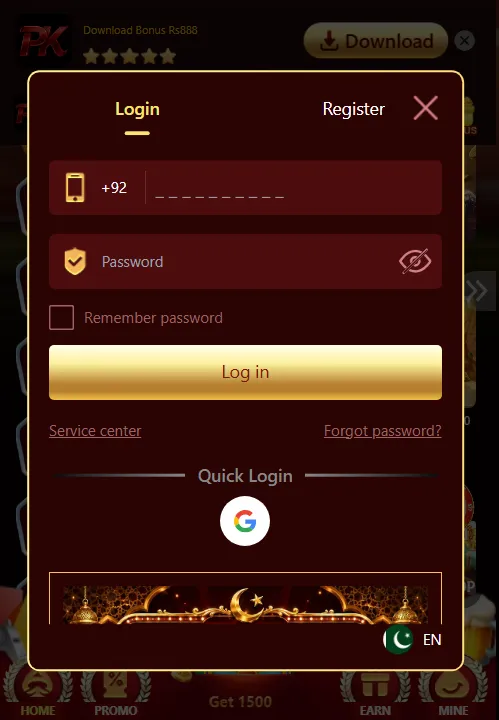
Mobile Number Login
- Open the PKPLUS app or official website.
- Tap on the Login button on the home screen.
- Enter your registered mobile number or username.
- Type your password and double check it.
- Then click on the Sign In button.
Google Login (Quick Access)
PKPLUS Game also provides a quick login option using your Google account. It’s helpful if you don’t want to enter your details every time. Simply tap on the “Quick Login” option on the login screen. After that select your Google account and the system will automatically log you in or create your account if you are a new user.
If you haven’t created an account yet check out our PKPLUS Game Sign Up Guide first.
Common Login Problems and Solutions
1. Incorrect Password
It usually happens when typing especially with uppercase and lowercase letters.
Solution: Recheck your password and enter it again carefully.
2. Forgot Password
Many users don’t save their login details after registration.
Solution: Click on the “Forgot Password” option and enter your registered number in the required field. You will receive an OTP code on your number, which you can use to set a new password.
3. OTP Code Not Received
In some cases the verification code (OTP) may take a few minutes to reach your phone because of a slow internet connection or a server issue
Solution: Just make sure your internet connection is stable and your number is active.
4. Login Error
Login may not work properly during server updates or temporary app issues.
Solution: You can’t do anything in that situation. You need to wait until the app works properly.
5. Account Access Restricted
Temporary account restrictions may happen during security checks.
Solution: You can contact customer support and they will help you recover your ID. Most of the time, the account is recovered after verification.
Safety Tips for PKPLUS Account Log in
- Always enter your password carefully to avoid repeated failed login attempts.
- Never type your login details on unknown or suspicious pages.
- On shared devices avoid using auto saved passwords.
- Instead of trying again and again, wait a bit if login doesn’t work.
- Always log out after using your account on public or shared devices.
FAQ (Frequently Asked Questions)
1. How do I log in to my PKPLUS app account?
Simply open the app or website, enter your registered mobile and password then tap the login button.
2. What should I do if I forget my password?
Click on the “Forgot Password” option and follow the instructions to recover your password.
3. Why am I not receiving the OTP?
Delays can happen due to network problems or server traffic. Try again after a short wait and also check your connection
4. Why is my PK PLUS login not working?
This may happen due to incorrect details, server maintenance, or temporary app issues. Try again after some time.
5. Can I log in using Google account?
Yes, you can log in using your Google account which is very quick and doesn’t require you to type your credentials.
6. What happens if I enter the wrong password multiple times?
Your account may be temporarily restricted for security reasons so it is recommended not to attempt multiple logins.
Final Thoughts
That’s all about the PKPLUS login process. If you follow the steps carefully then logging in is usually quick and simple. Just make sure your details are correct and your connection is stable to avoid any issues.